Client portals for freelancers and small agencies
One calm, private place to hand over work to every client
Give each client their own portal for files, updates, approvals and requests, instead of scattered emails and drive links.
14-day free trial. No card required.
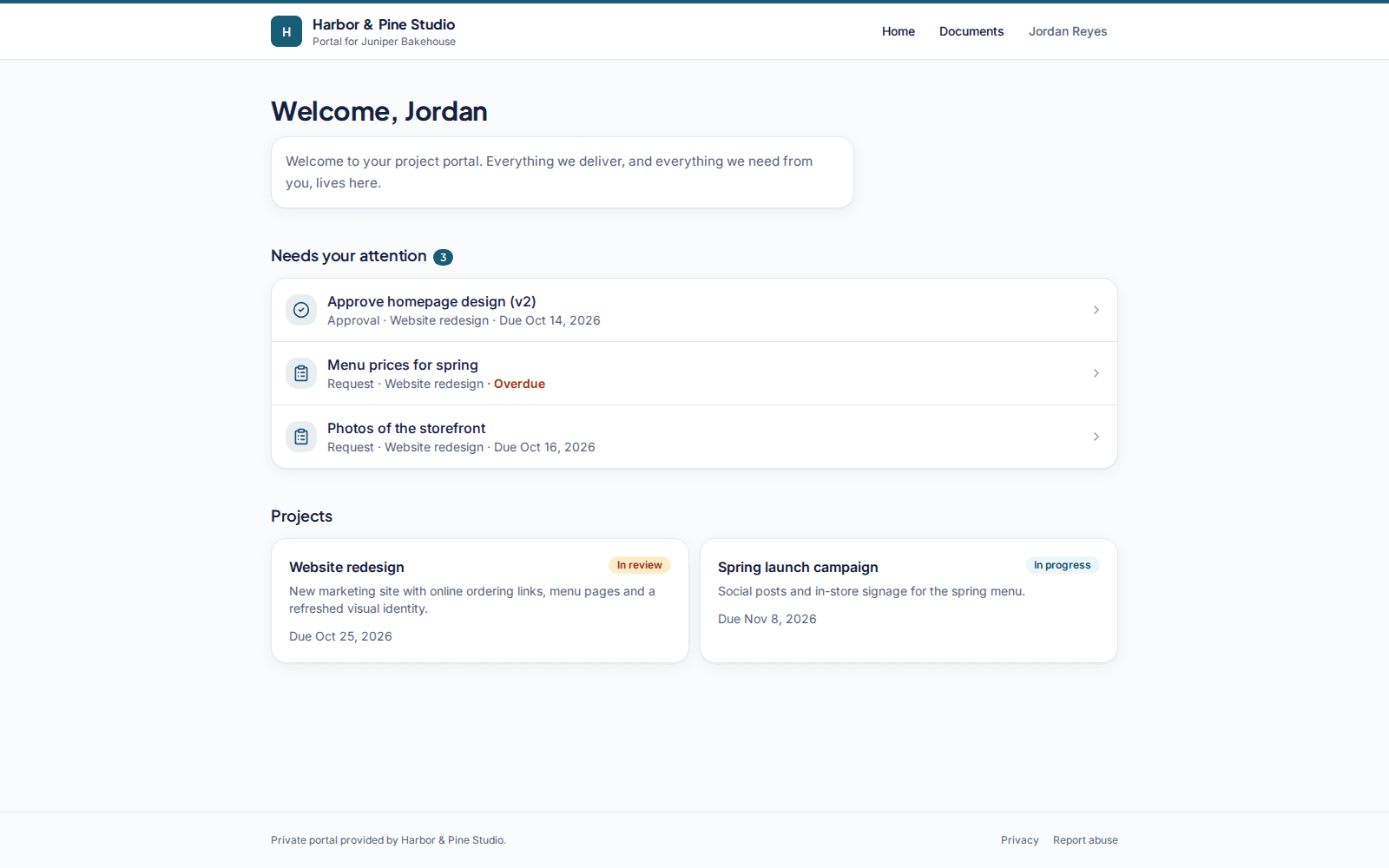
How it works
Three steps, and the handover lives in one place instead of ten email threads.
- 1
Add a client and invite their contacts
Create a client, add a project and invite the people you work with by email. They sign in with a magic link, no password.
- 2
Share the work in their portal
Upload files and new versions, post short updates and list what you need from them. Everything sits in one private place.
- 3
Collect approvals and get what you need
Clients approve or request changes on the exact version, tick off requests and comment on approvals, requests and updates.
Features
Everything a handover needs, nothing it doesn't
A small set of tools that work well together, built around the way client work actually moves.
Client portals
A private portal per client with everything that belongs to them, and nothing that doesn't.
File delivery
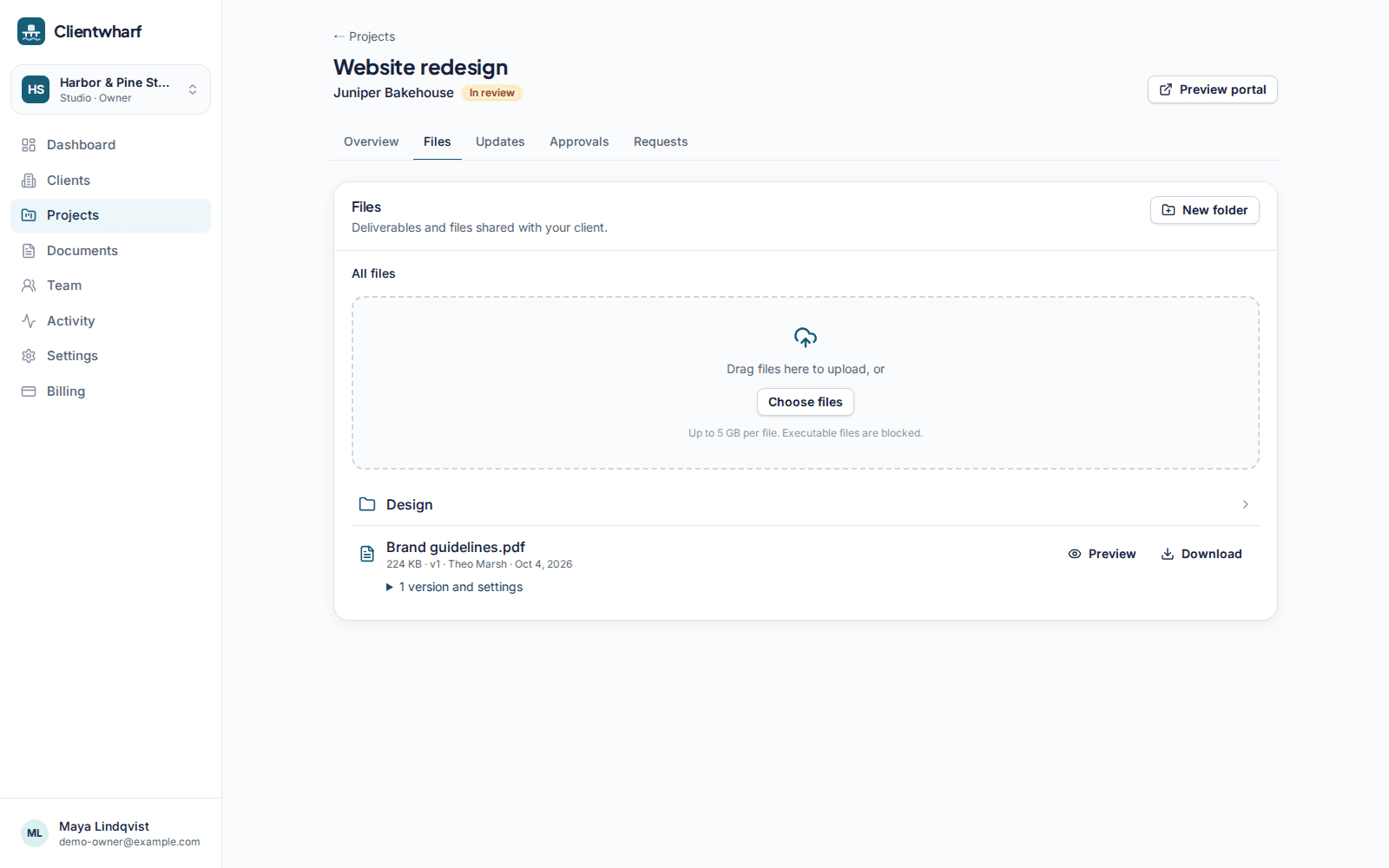
Folders, versions, previews and private download links for every deliverable.
Approvals
Ask for sign-off on a specific version and keep a permanent record of the answer.
Requests
A checklist of what you need from the client, with uploads and due dates.
Updates timeline
Short progress updates your clients can read in order, with comments.
Branding
Your logo and accent colour on every portal, and your own address on higher plans.
Quotes and invoices
Branded quote and invoice PDFs shared in the portal. Documents only, no payments.
Team and permissions
Invite teammates with Owner, Admin and Member roles, tighter permissions and an audit log on higher plans.
A closer look
File delivery
The latest version, always in the same place
Upload deliverables into folders and keep every version. Clients preview images and PDFs in the browser and download through private links that expire after a few minutes.
- Large uploads sent in parts
- Version history on every file
- No public download pages
Approvals
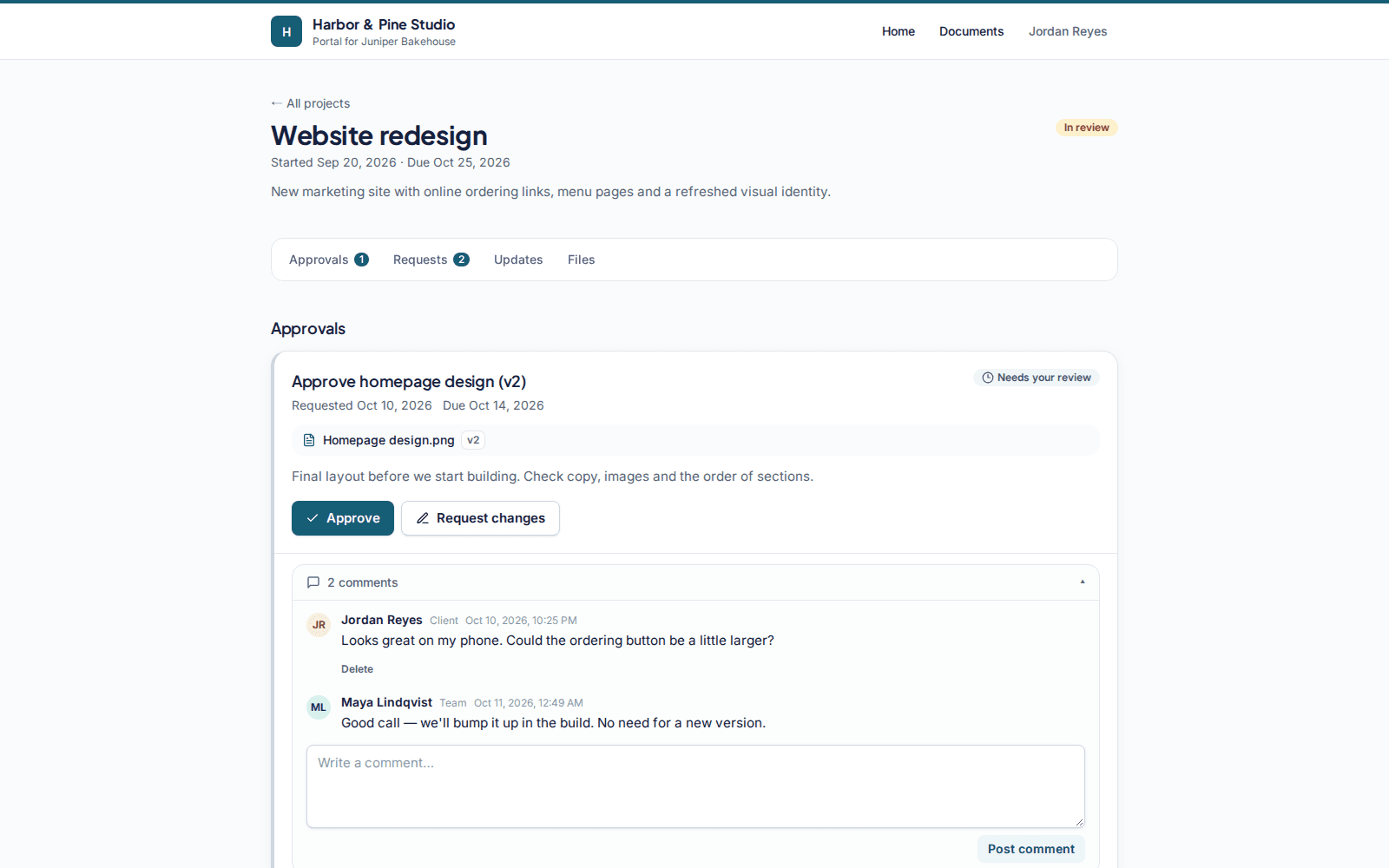
A clear yes, on the exact version
Ask for sign-off on a file or deliverable. Clients approve or request changes with a comment, and the decision is stored with their name, the version and the time. Export it as a PDF whenever you need it.
- Approve or request changes
- Permanent, unchangeable record
- PDF export
Requests
Stop chasing logos, copy and logins
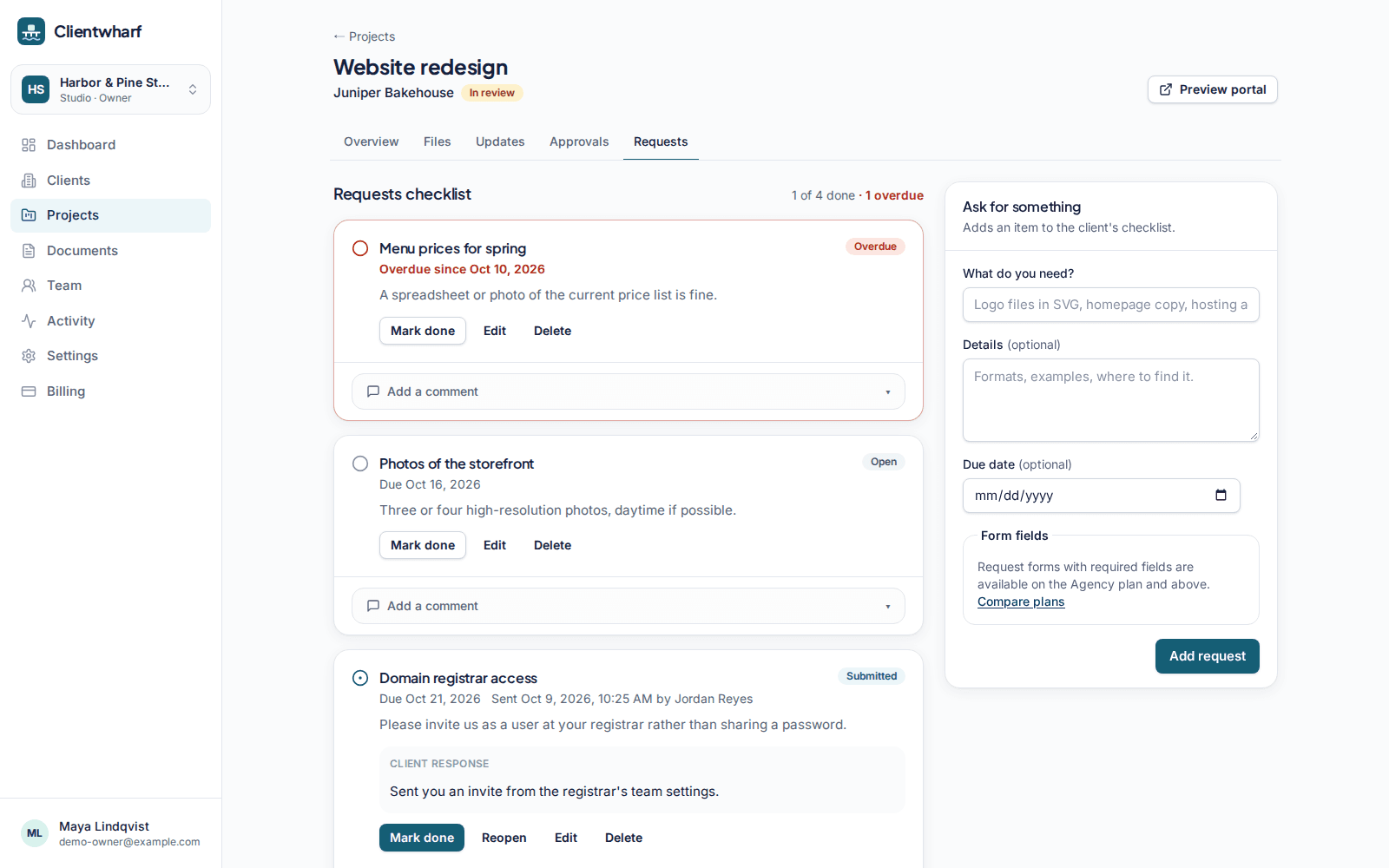
List what you need from the client as a checklist with due dates. They reply, attach files and mark items done, and you see at a glance what is still missing.
- Files attached to each request
- Overdue reminders by email
- Request forms on Agency and above
Who it's for
Built for people who deliver work to clients
Freelancers, studios and small agencies that already have clients and want a calmer way to hand over work.
Freelancers
One portal per client, without the admin.
Design studios
Versions, feedback and sign-off on designs.
Web and dev agencies
Collect content and access, ship with approval.
Marketing agencies
Campaign assets, reports and approvals.
Your clients' files stay private
Clientwharf is not a file-sharing site. Work is shared with the people you invite and nobody else.
How we protect dataPrivate by default
Files are shared only with the client contacts you invite. No public links.
Signed downloads
Every download uses a signed link that expires shortly after it is created.
Isolated workspaces
Tenant isolation is enforced in the data layer, and contacts only see their own portal.
Two-factor sign-in
Team members can protect their account with an authenticator app.
Pricing
Plans for one person up to a whole agency
Every plan starts with a 14-day free trial, no card required. Pay monthly, or yearly and get 2 months free.
Solo
1 seat · 5 active clients · 5 GB
$15USD/month
Freelancer Pro
1 seat · 20 active clients · 25 GB
$29USD/month
Studio
3 seats · 50 active clients · 100 GB
$45USD/month
Agency
10 seats · Unlimited clients · 250 GB
$75USD/month
Agency Plus
25 seats · Unlimited clients · 500 GB
$120USD/month
Scale
50 seats · Unlimited clients · 1 TB
$165USD/month
Prices in USD. Applicable taxes are calculated at checkout by Paddle, our reseller.
Compare plansFrequently asked questions
What is Clientwharf?
Clientwharf is a client portal for freelancers and small agencies. Each of your clients gets a private portal where you share files, post updates, ask for approvals and collect what you need from them.
Do my clients need a password?
No. Client contacts sign in with a magic link sent to their email address. They only ever see their own portal.
How does the free trial work?
The trial lasts 14 days and does not need a card. If you don't subscribe, your workspace becomes read-only: nothing is deleted and your data is kept for at least 30 days.
Can my clients pay invoices through Clientwharf?
No. Clientwharf doesn't process payments. You can create quote and invoice documents and share them in the portal, and you set their status yourself.
Where is my data stored?
The application runs on Vercel and the database on Neon, both in the United States. Files are kept in a private Cloudflare R2 bucket and are only reachable through short-lived signed links.
Can I cancel at any time?
Yes. Cancel from Billing in your workspace (Manage subscription) or at paddle.net. You keep access until the end of the period you paid for, then the workspace becomes read-only. Nothing is deleted.
Can I get a refund?
New subscriptions come with a 30-day money-back guarantee: if you ask within 30 days of your first payment on any plan, you get a full refund, no questions asked. A renewal charge can be refunded if you ask within 14 days of the renewal and haven't used the service since it renewed. Request a refund at paddle.net using the email on your order, or email support@clientwharf.com and we will process it through Paddle. Your statutory rights are not affected.
Give every client one calm place to find their work
Try Clientwharf free for 14 days. No card required, and nothing is deleted if you decide not to continue.